As a researcher, I frequently work with Word files in my daily work. When I want to have AI assistants analyze technical documents containing mathematical equations, I encountered a problem.
When you pass Word files directly to LLMs, equations are not correctly recognized.
To solve this challenge, I developed eqword2llm.
The Challenge: Why Existing Tools Are Insufficient
Limitations of Pandoc
Pandoc is an excellent conversion tool, but it cannot fully handle Word-specific issues.
For example, when converting a document that uses Word's equation numbering feature:

Equation with Field Code

$$\begin{array}{r}
\mathbf{E = m}\mathbf{c}^{\mathbf{2}}\mathbf{\#}\left( \mathbf{}\mathbf{\ SEQ\ Equation\ \backslash*\ ARABIC\ }\mathbf{}\mathbf{1}\mathbf{} \right)
\end{array}$$

Another Equation

$$\begin{array}{r}
\mathbf{F = ma\#}\left( \mathbf{}\mathbf{\ SEQ\ Equation\ \backslash*\ ARABIC\ }\mathbf{}\mathbf{2}\mathbf{} \right)
\end{array}$$
The internal Word field code SEQ Equation is output as-is. This prevents LLMs from correctly understanding the equations.
Limitations of Mammoth
Mammoth completely ignores equations. While it preserves heading structure, the essential equations disappear, making it unusable for scientific and technical documents.
Features of eqword2llm
1. Clean LaTeX Output
When converting the same document with eqword2llm:
Equation with Field Code

$$
E=mc^{2}
$$

Another Equation

$$
F=ma
$$
Field codes are removed, and only pure LaTeX equations are output.
2. Use of Standard LaTeX Environments
Let's compare the conversion of determinants.

Pandoc:
$$|A| = \left| \begin{matrix}
a & b \\
c & d
\end{matrix} \right| = ad - bc$$
eqword2llm:
$$
\left|A\right|=\begin{vmatrix}a & b \\ c & d\end{vmatrix}=ad-bc
$$
eqword2llm uses the standard determinant environment \begin{vmatrix}. The code is 27% shorter and the intent is clearer.
3. LLM-Ready Output Formats (v0.4.0+)
Starting from v0.4.0, output formats designed for LLM input are supported.
Structured Format (with YAML Frontmatter)
eqword2llm document.docx --format structured
Output:
---
format: eqword2llm/v1
source: document.docx
stats:
  sections: 3
  equations: 5
  headings: 8
equations:
  - id: 1
    latex: "E = mc^{2}"
    type: block
  - id: 2
    latex: "F = ma"
    type: block
---

# Document content...
A list of equations and statistics are attached as metadata. This makes it easier for LLMs to understand the document structure.
Prompt Format (LLM Prompt Generation)
eqword2llm document.docx --format prompt
Outputs in a format that can be directly passed to LLM APIs:
# Document for Analysis

## Document Information
- Source: document.docx
- Equations: 5
- Sections: 3

## Content

[Converted Markdown]

---

## Instructions

This document was converted from a Word file using eqword2llm.
Mathematical equations are formatted in LaTeX:
- Block equations: `$$...$$`
- Inline equations: `$...$`

Please analyze the content. If you need clarification about any equation or
concept, ask the user.
Usage
Installation
pip install eqword2llm
Zero dependencies. Works with Python standard library only.
CLI
# Basic conversion
eqword2llm paper.docx -o paper.md

# Without equation numbers
eqword2llm paper.docx -o paper.md --no-equation-numbers

# With metadata
eqword2llm paper.docx -o paper.md --format structured

# LLM prompt format
eqword2llm paper.docx --format prompt | pbcopy  # Copy to clipboard
Python API
from eqword2llm import WordToMarkdownConverter

# Basic conversion
converter = WordToMarkdownConverter("paper.docx")
markdown = converter.convert()

# Conversion with metadata
result = converter.convert_structured()
print(f"Number of equations: {result.metadata.equation_count}")
for eq in result.metadata.equations:
    print(f"  [{eq.id}] {eq.latex}")

# LLM prompt generation
prompt = converter.to_llm_prompt()
# Add custom instructions
prompt = converter.to_llm_prompt(
    instructions="Please explain the main equations in this document."
)
Integration with Claude API
import anthropic
from eqword2llm import WordToMarkdownConverter

# Convert Word document to LLM prompt
converter = WordToMarkdownConverter("research_paper.docx")
prompt = converter.to_llm_prompt()

# Send to Claude
client = anthropic.Anthropic()
response = client.messages.create(
    model="claude-sonnet-4-20250514",
    max_tokens=4096,
    messages=[{"role": "user", "content": prompt}]
)

print(response.content[0].text)
How Conversion Works
Word documents (.docx) are actually ZIP files containing XML internally. Equations are written in OMML (Office Math Markup Language) format.
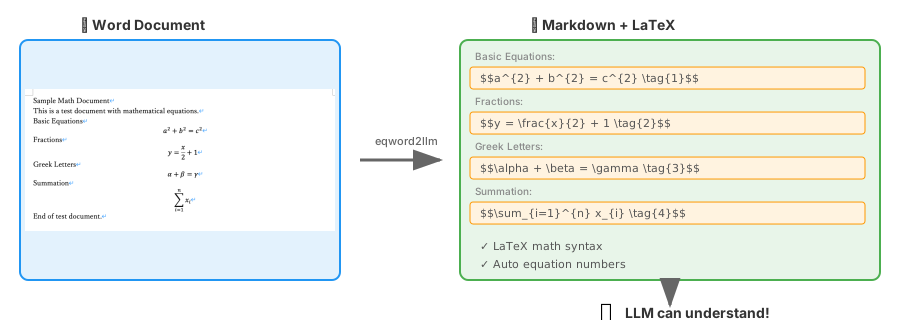
eqword2llm parses this OMML and converts it to LaTeX format. During conversion:
- Word field codes (such as
SEQ Equation) are removed - Appropriate LaTeX environments are selected (
vmatrix,bmatrix,pmatrix, etc.) - Mathematical functions are converted to standard form (
lim→\lim,sin→\sin) - Heading structure is preserved in Markdown format
Comparison with Pandoc
| Feature | Pandoc | eqword2llm |
|---|---|---|
| Equation conversion | △ Partial | ✅ |
| Field code processing | ❌ | ✅ |
| Markdown headings | ❌ | ✅ |
| Determinant environment | \left|...\right| | \begin{vmatrix} |
| Vector notation | \overset{\rightarrow}{v} | \vec{v} |
| Metadata output | ❌ | ✅ |
| LLM prompt generation | ❌ | ✅ |
| Dependencies | Many | Zero |
For detailed comparison, see comparison-details.md.
Future Plans
Features currently under consideration:
- Table conversion: Word tables → Markdown tables
- Image extraction: External file export of embedded images
- Cross-references: Maintaining equation references
Summary
eqword2llm is a tool focused on one thing: "making LLMs accurately read Word documents containing equations."
I hope you'll find it useful when you want AI assistants to analyze documents containing equations, such as research papers, technical reports, and lecture materials.
Repository: https://github.com/manabelab/eqword2llm
PyPI: https://pypi.org/project/eqword2llm/
License: MIT
コメント
コメントを投稿